
Import
Bring your board with you
Move a board from Trello, Jira, Asana or any spreadsheet into craaft. Upload the export, check what comes across, and land on a new board with your columns and cards in place.
How it works
4 steps, and nothing is made until the last one
-
Step 1
Choose the source
Pick Trello, Jira, Asana, CSV or craaft. Or drop the file in and craaft works out which it is.
-
Step 2
Upload the file
One export, up to 5 MiB.
-
Step 3
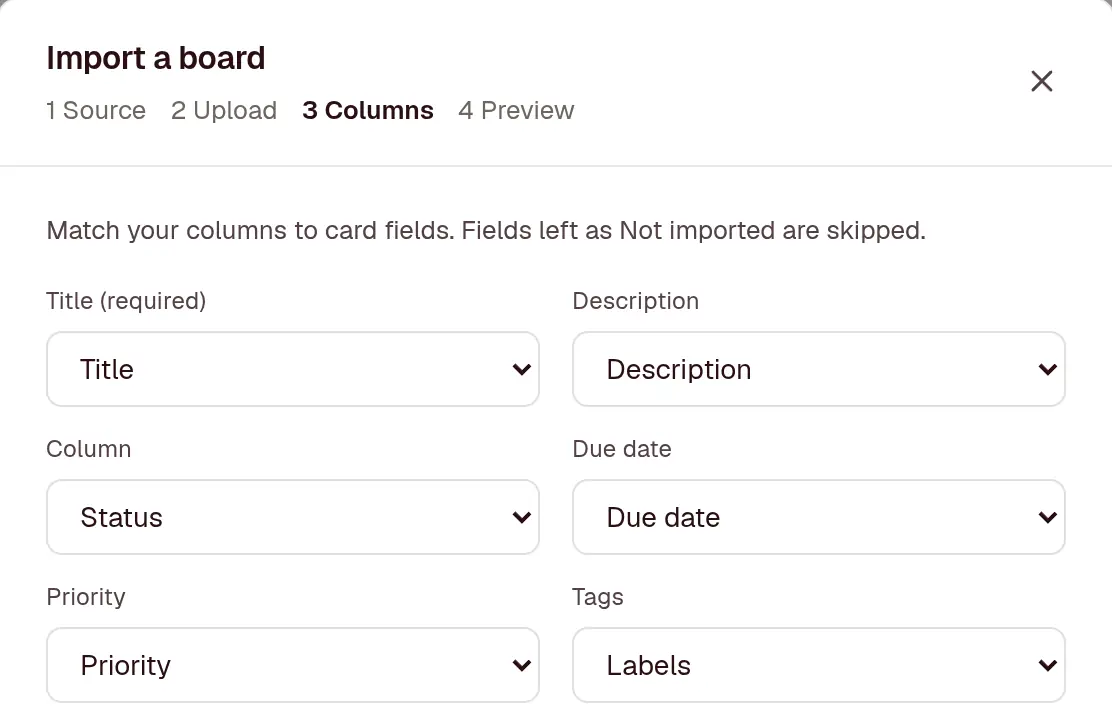
Match the columns
For a CSV, craaft matches your headers to card fields and shows the first 3 rows. Change any match, or leave a field out.
-
Step 4
Check the preview, then import
See the board’s name, its columns with their card counts, and who gets access. Nothing exists until you press Import.
import_board("office-move.csv")From Trello
In Trello, open the board menu, then Print, export and share, then Export as JSON.
- Lists become columns, in the same order
- Cards keep their description and due date, labels become tags, and members become assignees
- Checklists and comments come across
- Archived cards stay archived
Trello’s export keeps only the latest 1,000 actions, so on a busy board the oldest comments aren’t in the file. Attachments stay in Trello.
From Jira
In Jira, search for the issues, then Export, then Export CSV (all fields).
- Summary becomes the title, and Description the description
- Each Status becomes a column
- Due date, Priority, Labels and Assignee map across
craaft spots a Jira export by its Summary, Issue key and Status columns, and fills in the matches for you.
From Asana
In Asana, open the project menu, then Export, then CSV.
- Name becomes the title, and Notes the description
- Each Section/Column becomes a column
- Due Date, Tags and Assignee Email map across
- Completed tasks come in archived
From a spreadsheet
Any spreadsheet saved as CSV (UTF-8), with a header row and one row per card.
- Match any header to the title, description, column, due date, priority, tags, assignee or archived
- Common headers like Status, Due and Labels are matched for you
- Dates can be 2026-10-20, 20/10/2026 or 10/20/2026: craaft works out the order for each file
From another craaft board
In a craaft board, open Settings, then Import / export, then Export JSON.
- Columns keep their colours, WIP limits and which ones count as done
- Cards keep their checklists and comments
- Useful for copying a board into another workspace
What every import does
- Makes a new board, and changes nothing that already exists
- Takes up to 2,000 cards and 200 columns from one file
- Matches assignees to people in your workspace by email, username or name, and gives them access to the new board
- Sends no emails or notifications while it runs
- Works on every plan. The new board counts towards the 3 projects on Free
Bring one board over and see
Free for 3 projects, with no credit card to enter. Every board exports again as JSON or CSV whenever you want to leave.