craaft

Simple task management for AI and humans

One kanban board your team drags cards across and your agents work through MCP or the API. Same cards, same permissions, and every move shows up for everyone as it happens.

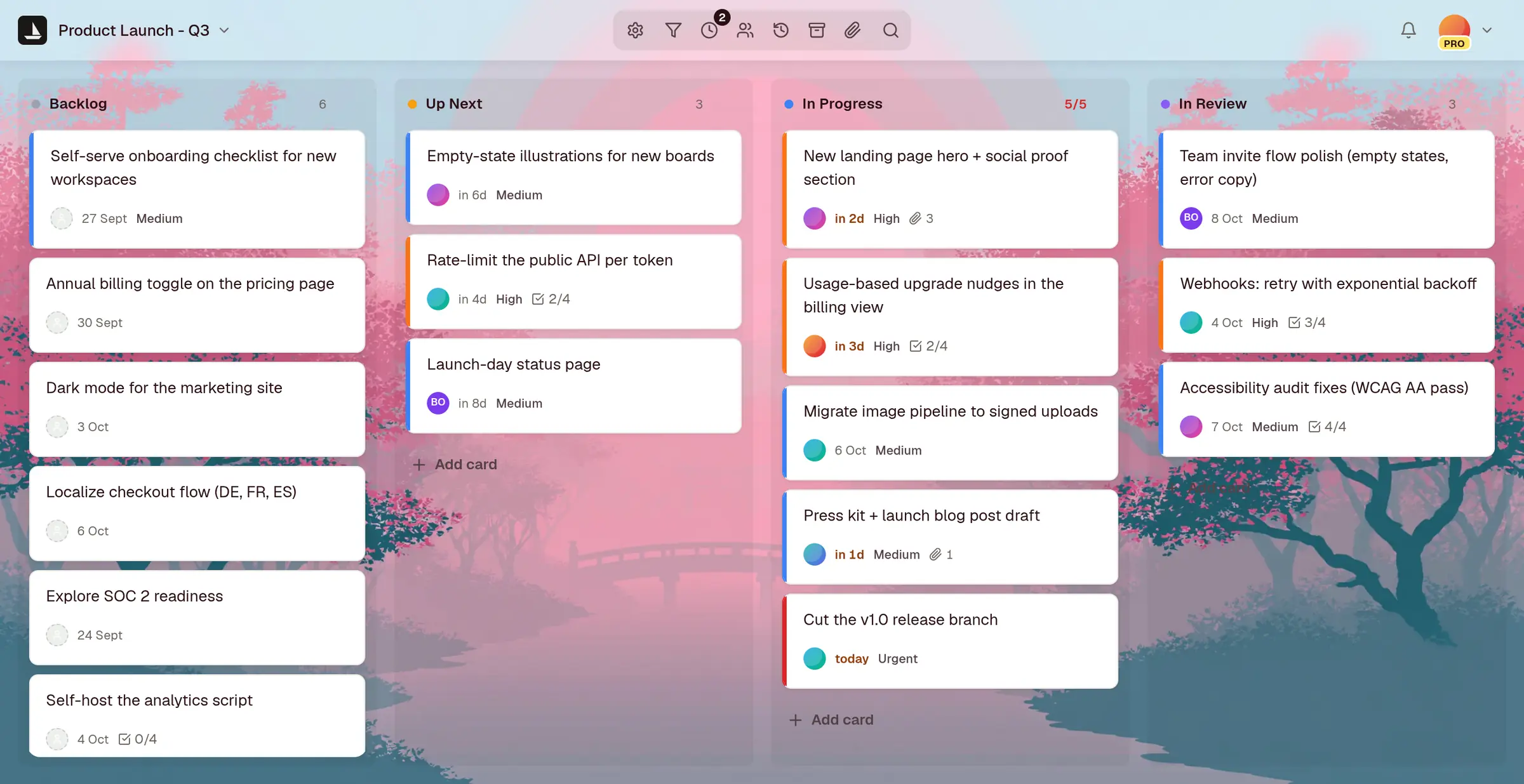
A craaft board called Product Launch, with Backlog, Up Next, In Progress and In Review columns. Cards show assignees, due dates, priorities and checklist progress, and In Progress is at its WIP limit of 5.
agentmove_card("Cut the v1.0 release branch", "In Review")
About a minute
To a working board
3 projects
Free forever, no credit card
MCP and REST
For agents, on every plan

For agents

Your agents work the same board you do

Point Claude Code, Cursor or your own script at a board. It reads the cards, adds work and moves it across, with your permissions and nothing more. The API spec is public at /openapi.yaml, and all of it is on the Free plan.

An MCP server for agents

Claude, Claude Code, Cursor and any MCP client can list your boards, add cards, move them and search across projects. Claude signs in with your craaft account, so there is no key to copy.

get_boardread a board create_cardadd work move_cardmove it along
A REST call for everything

Projects, cards, comments, checklists, milestones, members, search and export. Bulk endpoints create, update or move up to 100 cards in one transaction.

POST/projects/{id}/cards201 PATCH/cards/bulk200

3 first-party SDKs

Python, TypeScript and PHP, each maintained by us against the same spec, so your scripts never wait on the client to catch up.

Pythonpip install craaft TypeScriptnpm i craaft PHPcomposer require craaft/craaft

For people

Stop losing decisions in the chat

The comment, the attachment and the reason the priority changed all sit on the card, 3 weeks and 300 cards later.

Say it on the card

Threaded comments and @mentions, with an activity trail of every move, rename and reassign.

Maya Pushed v2, see the attachment Ava @maya love it, ship Friday Ava changed priority to High

Attach the actual file

Specs, mockups and recordings up to 25 MiB, stored against the card instead of an inbox.

PNGhomepage-hero.png2.4 MB PDFlaunch-plan.pdf810 KB

Only the fields that earn it

Assignee, due date, size, priority, checklist. Every one optional, none of them nagging you.

AssigneeAva Chen Due29 Aug in 2 days PriorityHigh

Every morning

Know what needs you before anyone asks

Focus pulls every board you can open into one list, so nothing waits on someone remembering to look.

  • Overdue, due today and due this week, across every board
  • Needs attention: cards with no date that are high priority or haven’t moved in a week
  • To tidy: cards with no details, cards untouched for 2 weeks, and yours with no date
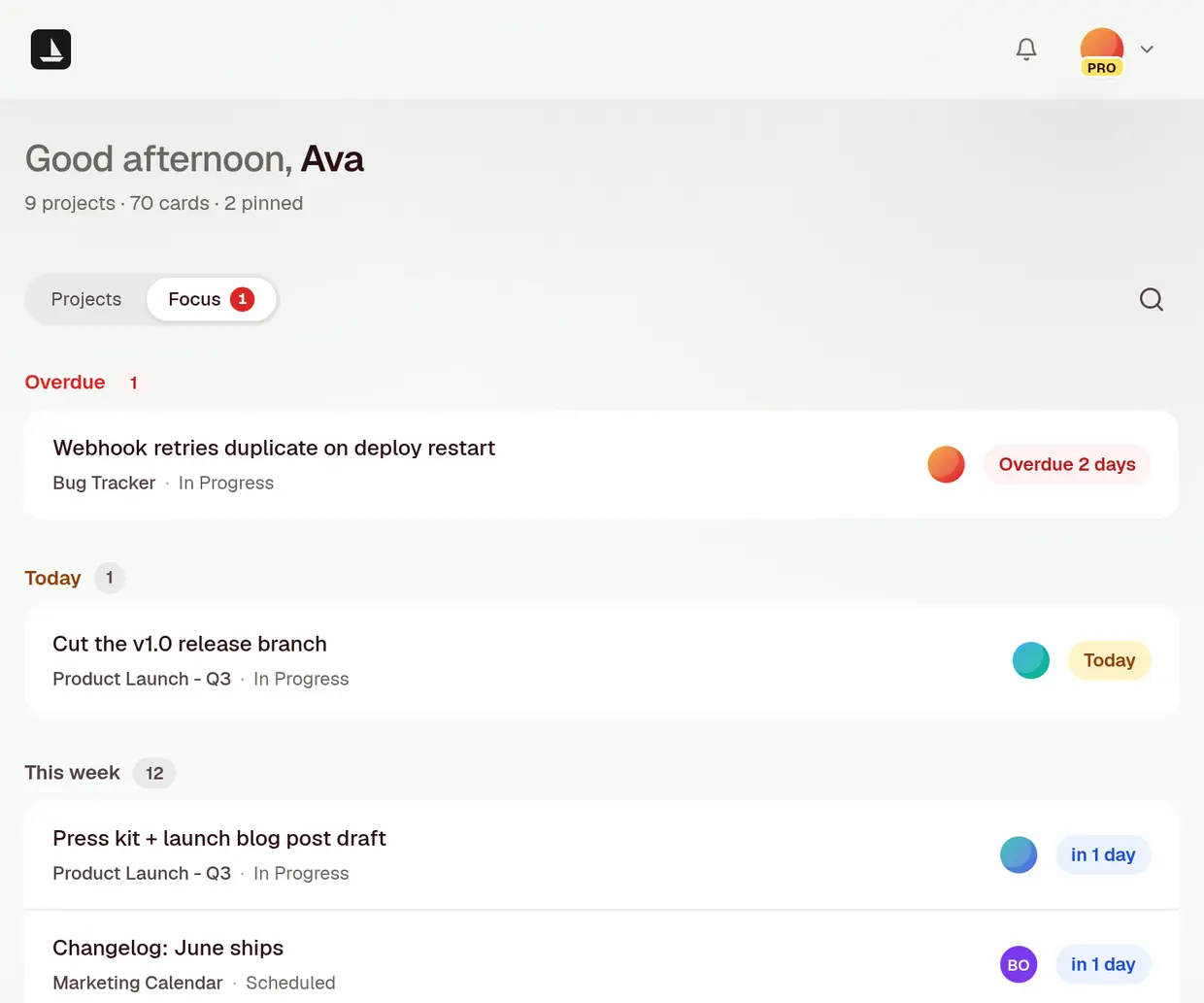
The Focus view: 1 card overdue by 2 days, 1 due today and 12 due this week, each with its board, column and assignee.
agentget_focus()

Run the standup from the board

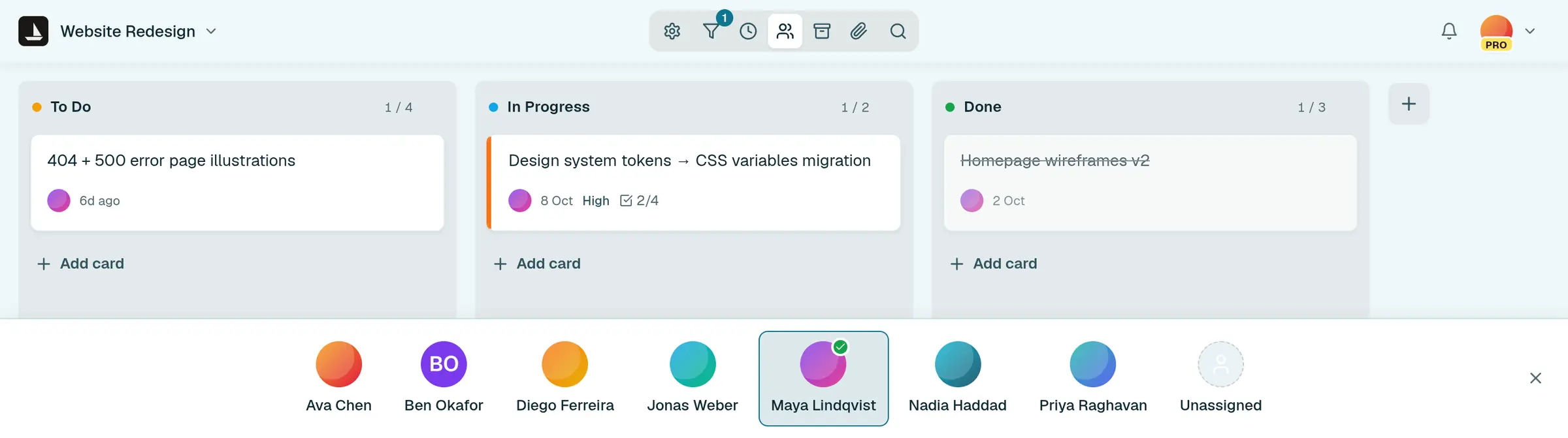
Standup goes through the board one person at a time. Pick a name and the board shows only their cards, with a count in every column.

A board in standup mode with Maya selected: each column shows only her card, such as 1 of 4 in To Do, and a bar along the bottom lists everyone on the board.

Email to card

Forward the email. Get a card.

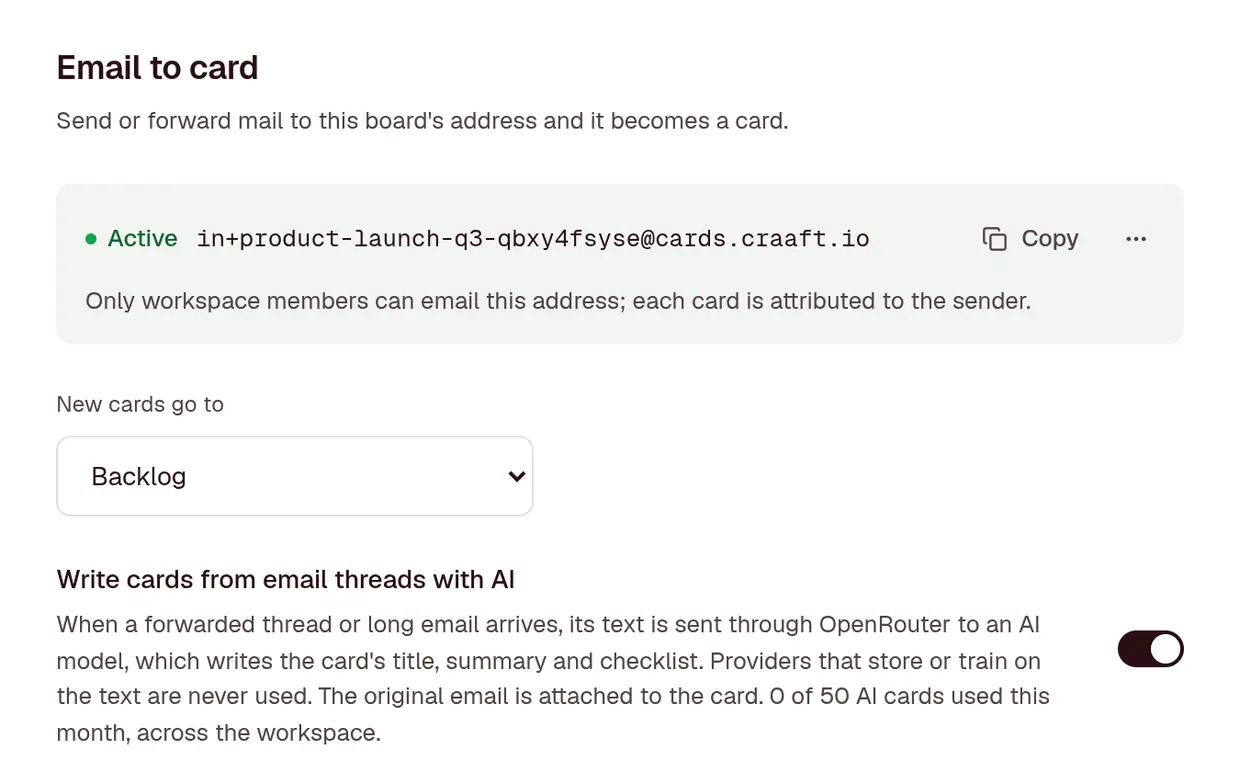
On Pro, every board has its own address. Send or forward mail to it and it lands on the board as a card, with its attachments.

  • Only people in your workspace can send to it, and each card is attributed to its sender
  • A forwarded thread keeps its latest message, with the whole email attached
  • Turn on AI cards and a long thread becomes a title, a summary and a checklist of the asks, 50 a month
  • That text goes through OpenRouter, never to a provider that stores or trains on it
A board's Email to card settings: an active address, new cards going to Backlog, and AI cards switched on with 0 of 50 used this month.
agentenable_inbound_email("Product Launch - Q3")

Switching

Bring your board with you

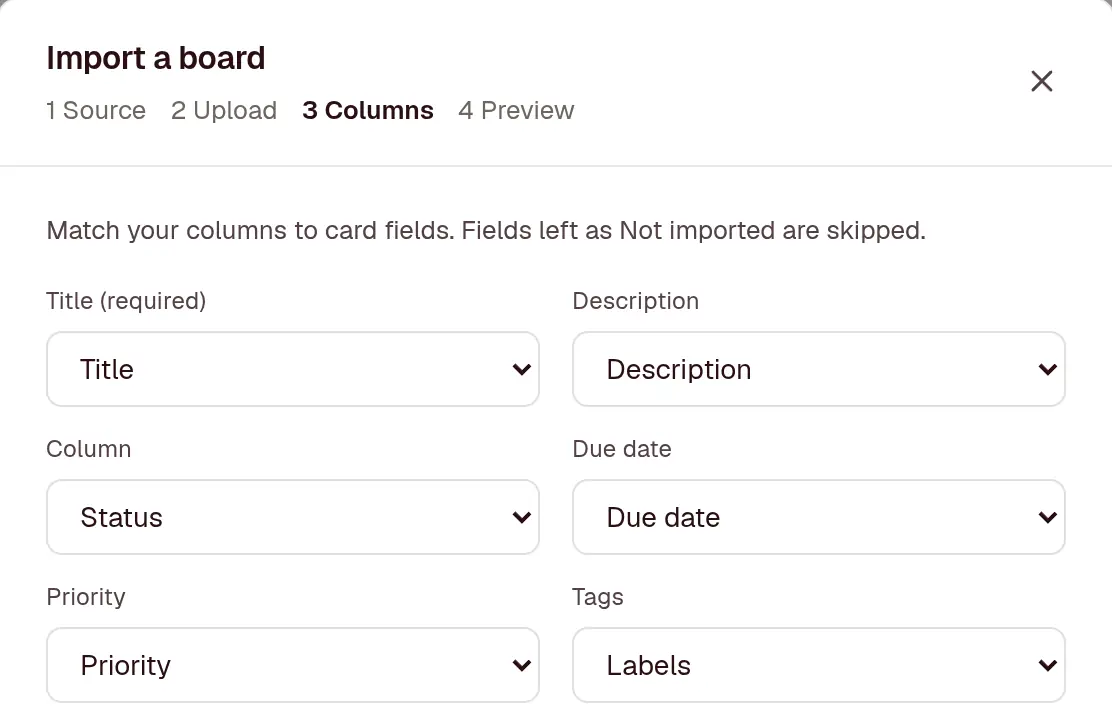
Upload an export from Trello, Jira or Asana, or any CSV. craaft matches the columns, shows you a preview, then makes a new board.

  • Columns, cards, tags, due dates, checklists and comments come across, as far as the export has them
  • Up to 2,000 cards at a time, and nobody gets a notification while it runs
  • On every plan, and every board exports as JSON or CSV when you want to leave
Importing a CSV: craaft has matched the file's Title, Description, Status, Due date, Priority and Labels columns to card fields.
agentimport_board("office-move.csv")

Setup

From nothing to a working board in about a minute

  1. 0:00

    Make a board

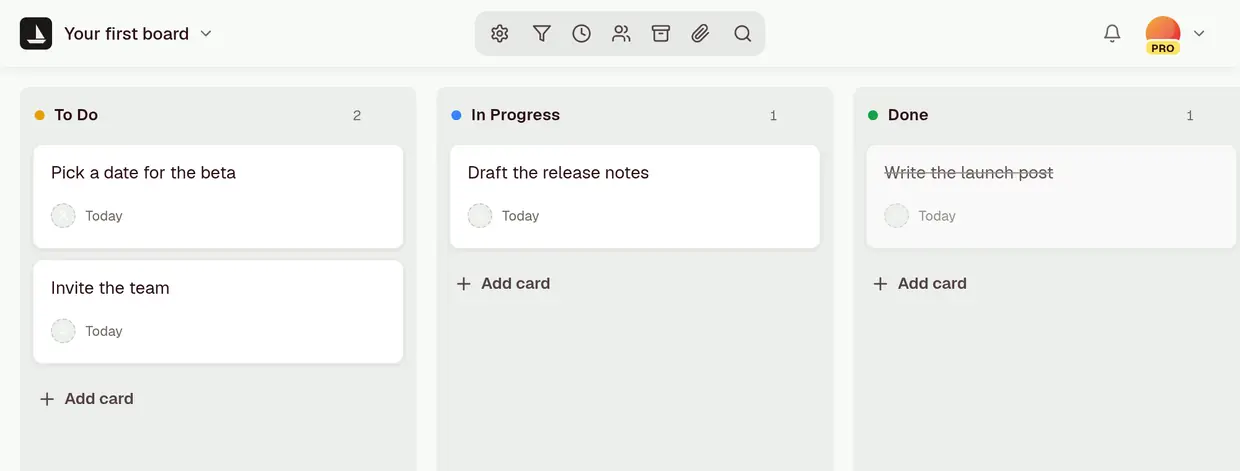
    It arrives with To Do, In Progress and Done already on it. That is a working kanban before you touch anything.

  2. 0:10

    Add a card

    A title is enough. Everything else waits until it matters.

  3. 0:25

    Drag it across

    Anyone else with the board open sees it move at the same moment, without refreshing.

  4. 0:45

    Point an agent at it

    Add the MCP server, sign in, and your agent reads and moves the same cards you just made.

A new board called Your first board, with To Do, In Progress and Done and a card in each.

Install for agents

2 commands and a sign-in, and your agent is on the board

One Claude Code plugin installs both halves. The first time it connects, you sign in with your craaft account in the browser. There is no token to copy.

  1. The MCP server gives your agent tools to read boards, add cards, move them and search. Claude Desktop and claude.ai can add it from the Claude directory, and other MCP clients take the same URL.
  2. The skill teaches Claude Code the API’s rules, like column keys and float positions, so the scripts it writes get the fields right. Those scripts use a personal access token, from Settings, then API keys.

# 1. The craaft plugin: MCP server and skill

claude plugin marketplace add craaft/skill
claude plugin install craaft@craaft

# 2. In Claude Code, pick craaft and sign in

/mcp

# Another MCP client? Point it at https://ai.craaft.io/mcp
# Then ask your agent what’s in To Do.

Pricing

Free for your own work. Pay when other people join in

Free

$0forever

For your own work.

  • Up to 3 projects
  • Unlimited cards
  • Live updates
  • Public read-only sharing
  • JSON and CSV export
  • Import from Trello, Jira, Asana or CSV
  • API and MCP for your agents
Start free

Pro monthly

$14per month

For a team, billed month to month.

  • Unlimited projects
  • Invite teammates, with roles
  • Attachments up to 25 MiB
  • Webhooks and email to card
  • Priority email support
  • Everything in Free
Start Pro monthly
Best value

Pro yearly

$140per year

For a team, billed once a year.

Save $28 against monthly

  • Everything in Pro monthly
  • 2 months free, every year
  • 1 invoice instead of 12
  • Renews yearly, cancel whenever
Start Pro yearly

Agents use your account, so they never need a seat of their own. Cancel any time, and every plan exports. Feature-by-feature comparison on the pricing page.

Open a board. Add a card. Move it.

That is the whole tutorial, for you and for your agents. No credit card to enter, nothing to cancel if you stop, and one click gets your projects back out whenever you want them.